Tracking link clicks
Link tracking allows you to automatically monitor which links visitors click on your website, providing valuable insights into user behavior and navigation patterns without requiring any manual tagging.
Overview
Link tracking in Pulse automatically captures clicks on all links (<a> tags) throughout your website. For each click, Pulse records:
- The destination URL (
hrefattribute) - The link text content
- The container element (article, nav, header, footer, etc.)
This data helps you understand which links are most popular, which content drives the most engagement, and how users navigate through your site.
Setup
Link tracking is designed to work with minimal configuration. To enable link tracking:
Enable during script initialization
Add the data-link-tracking="true" attribute to your Pulse tracking script:
<script
  defer async
  src="https://tracker.hakanai.io/hakanai.min.js"
  data-site="YOUR_SITE_ID"
  data-link-tracking="true">
</script>
How It Works
Once enabled, the link tracker:
- Adds a click event listener to the document
- Intercepts clicks on any
<a>element - Extracts relevant information from the clicked link
- Sends this data to your Pulse dashboard
All of this happens automatically without requiring any additional code or markup on your links.
Dashboard Visualization
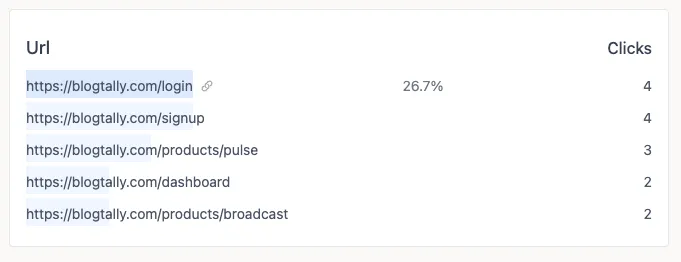
Link click data appears in your Pulse dashboard or on each page. You can see:
- A ranked list of the most clicked links
- Percentage of total clicks for each link
This information helps you understand:
- Which calls-to-action are most effective
- How users navigate your site
- Which external resources they find most valuable
Measuring Content Engagement
One of the most powerful applications of link tracking is measuring actual content engagement. Unlike traditional metrics that only show if someone visited a page, link tracking reveals how they interacted with the content.
Content Effectiveness Metrics
With link tracking, you can measure:
- Content Value: Which internal content pieces drive the most clicks to conversion pages
- Resource Engagement: How often readers click on references, sources, or supplementary material
- Navigation Patterns: How readers move through a series of related content
Content Optimization Insights
By analyzing link clicks within content, you can:
- Identify which sections of your articles drive the most engagement
- Understand which types of calls-to-action perform best within content
- See which contextual links add the most value to readers
- Determine optimal link placement within your content structure
Use Cases for Content Creators
Link tracking provides content creators with actionable feedback:
- Blog Optimization: Discover which internal links readers find most relevant
- Documentation: See which help articles lead users to related information
- Knowledge Bases: Identify navigation patterns through technical content
- Marketing Content: Measure which pieces of content drive progression through the funnel
Performance Considerations
Link tracking is designed to be lightweight and won't impact your site's performance. The event listeners use event delegation to efficiently handle all links with minimal overhead.
Privacy Considerations
Link tracking only captures data about the links themselves, not personal information about the user clicking them. However, be aware that the link URL or text content might sometimes contain sensitive information depending on your site's structure.
Compatibility
The link tracker works in all modern browsers and degrades gracefully in older browsers. It's compatible with single-page applications (SPAs) and traditional multi-page websites.
Troubleshooting
- Link clicks not showing in dashboard? Verify that link tracking is enabled and that the Pulse script is properly loaded on your site.
Tracking events
Learn how to track specific events on your website with Hakanai Pulse. Measure user interactions and calculate conversion rates with event tracking.
Read-through depth
How Pulse measures how far into an article your readers get, which views are excluded from the measurement, and how to point the tracker at your content with data-content-selector.